Closed-Circuit Television (CCTV)
a system used to monitor and record video in a specific area, mainly for security and surveillance.
Unlike regular TV broadcasts (like channels you watch at home), CCTV is not public. the video is only sent to a limited set of monitors or devices and that what Closed-Circuit mean.
Cameras
They can be analog cameras or IP cameras, depending on the system type:
1. Analog Camera
Analog cameras capture light and convert it into a continuous electrical signal that represents the image. This signal is sent through a coaxial cable directly to a DVR. They are called analog because the video signal is not digital data (0s and 1s) it is a continuous electrical waveform rather than packets of information.
The DVR converts that signal into digital form, compresses it, and stores it on a hard drive. In this setup, the camera mainly captures the image while the DVR handles most of the processing.
Connect using coaxial cables with BNC connectors, usually in a direct one-to-one link between the camera and the DVR.
Cables
Each analog camera needs a power source connection (directly or via a shared power supply box) and a video cable (Coaxial/BNC):

- Video Cable (Coaxial/BNC)
- Power Cable (DC Cable)

2. IP Camera
IP cameras capture light, convert it into a digital image inside the camera itself, and then encode it into digital video format. They send this video over a network to an NVR or a software system.
They are called IP cameras because each camera behaves like a network device with its own IP address and communicates over standard network infrastructure like routers and switches.
Connect using Ethernet cables or Wi-Fi, often using PoE (Power over Ethernet) so the same cable can provide both power and data.
Audio Pigtail
While some cameras feature an audio input or alarm input
- microphone: audio encoder (usually
AACorG.711) - speaker: audio decoder output
a camera with talk-back functions like a walkie-talkie (half-duplex), many affordable or older security cameras operate this way, modern, high-quality cameras often support full-duplex communication, which operates more like a telephone call.
Reset Button
Some designs include a small cable with a button to reset the camera to factory settings.
Recorder
This stores and manages video footages from the camera. DVR is used for analog cameras, while NVR is used for IP cameras.
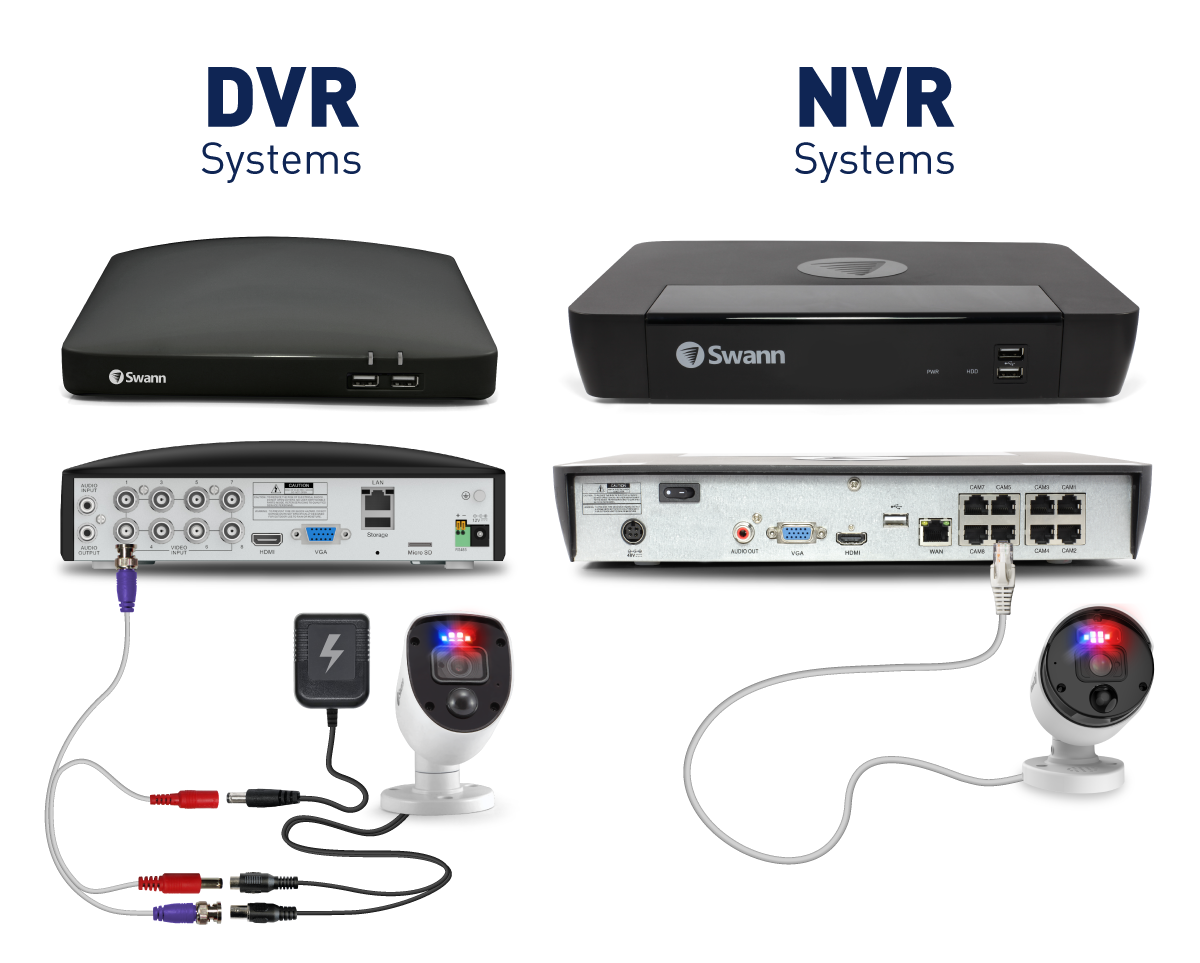
DVR (Digital Video Recorder)
A DVR records video from analog cameras. Converts analog to digital and compresses the video and stores it on a hard drive
NVR (Network Video Recorder)
An NVR records video from IP cameras. Cameras process video themselves. They send digital video over a network (Ethernet/Wi-Fi)
NVR receives already-processed video and stores it directly
Power Supply
Every camera and recorder needs electricity.
Some systems use individual power adapters per camera, while others use centralized power boxes or PoE switches that power multiple cameras through network cables.
CCTV: Power Distribution Box / Shared Power Supply Box
It is a box that takes one main AC power input (220V/110V) and converts it into multiple low-voltage outputs (usually 12V DC or 24V DC) to distributes power to many cameras at the same time
So instead of 10 cameras and 10 separate power adapters, you get 1 power box for 10 camera power outputs
Inside the box:
- a power transformer converts AC to DC
- a regulator stabilizes voltage
- multiple terminals (channels) send power out

Storage System
In CCTV, storage is where all recorded video is written and preserved for later viewing, search, or evidence.
It exists in two main places:
inside the recorder (DVR/NVR) or outside it (cloud or network storage).
1. Local storage
A DVR or NVR usually contains one or more hard disk drives (HDDs) that continuously record video from cameras.
The system writes video in a loop, meaning when the disk becomes full, it automatically overwrites the oldest footage unless it is locked or protected.
CCTV uses special surveillance hard drives because they are designed for continuous 24/7 writing, handling multiple video streams at once and reducing heat during long operation, reliability over speed
2. External storage
In more advanced systems, video is not only stored inside the DVR/NVR but also sent to a NAS (Network Attached Storage) device.
The NVR writes video to it over Ethernet, just like saving files to a shared drive.
3. Cloud storage
Some IP camera systems upload footage directly to cloud servers over the internet. Instead of storing video locally, the camera or NVR sends compressed video streams to remote servers managed by a provider.
Video is encrypted and transmitted over the internet, then stored in remote data centers where it can be accessed through apps or web portals.
DVR/NVR built-in software
A monitor is connected directly to the DVR or NVR, usually through HDMI or VGA. A mouse is also connected to the recorder, and the user navigates a built-in interface to view live feeds, search recordings by time, and export footage to a USB drive.
So the DVR/NVR itself acts like a small computer with its own operating system. Every recorder has its own embedded interface (like a mini operating system).
PTZ (Pan–Tilt–Zoom)
A PTZ camera is a type of camera that can be moved and controlled remotely.
It is called PTZ because:
- Pan: move left and right
- Tilt: move up and down
- Zoom: zoom in and out
A PTZ camera has internal motors that physically move the lens and camera head. When a user sends a command, the camera receives it over the network or cable and adjusts its position or zoom level.
VMS (Video Management System)
A software used to manage many CCTV cameras and recorders in one place.
It is not a camera or hardware device, it is a central control platform running on a computer or server.
A VMS receives video streams from multiple cameras and organizes them into a single system where users can view, control, record, and analyze everything from one interface.
Night Vision
Night vision cameras can see in complete darkness using infrared light (IR)
The camera has built-in IR LEDs that emit light invisible to the human eye. The camera sensor detects this reflected IR light and turns it into a visible black-and-white image.
So even if it looks dark to you, the camera is actually lighting up the area with infrared.
Color Night Vision (Low-light cameras)
Some modern cameras can still produce color video at night. They use a very sensitive image sensors, Large apertures (lets in more light). Sometimes small white-light LEDs instead of IR.
Thermal Cameras
These cameras don’t use visible light at all.
They detect infrared radiation (heat) emitted by objects and convert it into a heat map image. Warmer objects appear brighter, cooler ones appear darker.
Motion Detection Cameras
These cameras don’t record everything all the time. Instead, they detect movement in the video scene. The system compares frames over time. If enough pixels change (movement), it triggers recording or an alert.
CCTV-related ports
| Vendor / Context | Port | Protocol | Usage |
|---|---|---|---|
| All | 80 | HTTP | Web UI |
| All | 443 | HTTPS | Secure Web UI |
| IP cams | 554 | RTSP | Video streaming |
| Dahua | 37777 | TCP (proprietary) | Control + video |
| Dahua | 37778 | UDP | Video/data |
| Hikvision | 8000 | TCP | SDK/API |
| Many | 8080 | HTTP alt | Web UI |
| Many IP cams | 8899 | ONVIF | Device control |
| XM / Xiongmai | 34567 | TCP | Proprietary |
| Old IoT | 23 | Telnet | Debug/admin |
| Some systems | 22 | SSH | Admin access |
| Some DVRs | 21 | FTP | File access |
CCTV-related default passwords
admin:admin
admin:123456
666666:666666
666666:888888
888888:888888
default:tluafed
111111:111111
admin:admin123
user:user