the difference between Groups and Organizational Units (OUs).
OUs are useful for grouping users, groups, and computers to ease management and deploying Group Policy settings to specific objects in the domain.
Groups are primarily used to assign permissions to access resources.
OUs can also be used to delegate administrative tasks to a user, such as resetting passwords or unlocking user accounts without giving them additional admin rights that they may inherit through group membership.
Groups in Active Directory have two fundamental characteristics: type and scope.
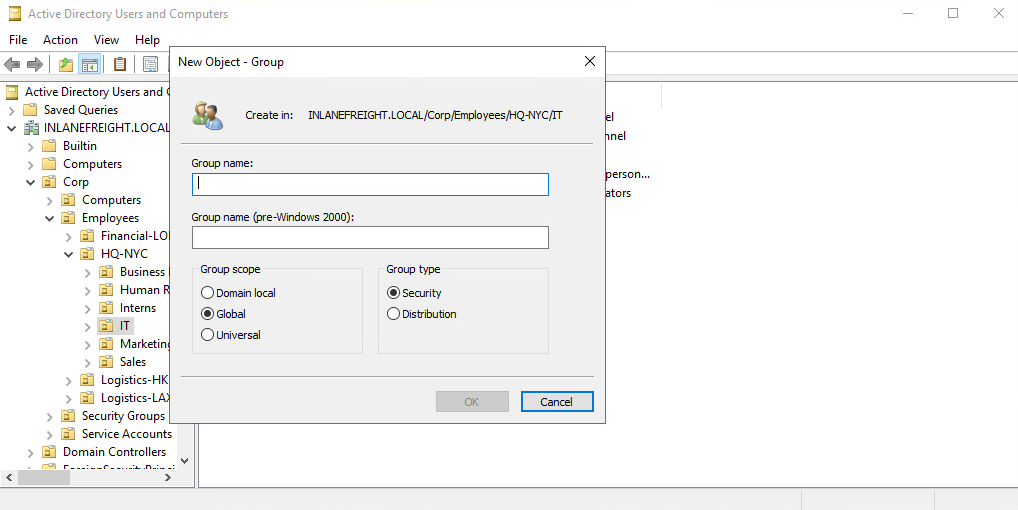
The group type defines the group’s purpose, while the group scope shows how the group can be used within the domain or forest.
Group Types
When creating a new group, we must select a group type. There are two main types:
-
Security groups: Used to assign permissions and rights to multiple users at once. Members automatically inherit the group’s permissions, making user management easier without changing the group’s permissions.
-
Distribution groups: Used for email distribution (like mailing lists in Outlook/Exchange). Cannot be used for resource permissions.
Group Scopes
There are three different group scopes that can be assigned when creating a new group.
-
Domain Local Group: Used to manage permissions only within its own domain. Can contain users from other domains. Can be nested in other domain local groups, but not in global groups.
-
Global Group: Can grant access to resources in other domains. Can contain users only from its own domain. Can be added to both global and domain local groups.
-
Universal Group: Used across multiple domains in a forest and can access resources anywhere in it. Can contain users from any domain. Stored in the Global Catalog, and changes trigger forest-wide replication.
Group scopes can be changed:
-
Global –> Universal Only if the global group is not a member of another global group
-
Domain Local –> Universal Only if it doesn’t contain other domain local groups
-
Universal –> Domain Local Can be done without restrictions
-
Universal –> Global Only if it doesn’t contain other universal groups
Built-in vs Custom Groups
Built-in groups: Created automatically, usually Domain Local (some like Domain Admins are Global). Used for specific administrative tasks.
Only allow user accounts (no group nesting).
Example: To give a user from another domain admin access, add them to Administrators (Domain Local).
Custom groups: Created by organizations for their own needs (security or distribution).
Nested Group Membership
Groups can be members of other groups. Users can inherit indirect permissions through nested groups.
This can lead to hidden or unintended privileges.
Tools like BloodHound help visualize these relationships.