DNS (Domain Name System)
A hierarchical, distributed database system and application-layer protocol.
DNS names are hierarchical labels separated by dots, read right to left because authority flows that way.
DNS Hierarchy
1. Root Server/Zone
At the very top of the DNS hierarchy is the root zone, it is represented by the null label, sometimes written as a dot.
Root servers are authoritative for the root zone. They do not contain complete DNS records for domains, only NS (Name Server) records pointing to TLD servers.
There are exactly 13 named root server identifiers, labeled A through M. Each identifier corresponds to a logical root server, not a single physical machine.
| Root ID | Hostname | Operator |
|---|---|---|
| A | a.root-servers.net |
Verisign, Inc. |
| B | b.root-servers.net |
University of Southern California ‑ ISI |
| C | c.root-servers.net |
Cogent Communications |
| D | d.root-servers.net |
University of Maryland |
| E | e.root-servers.net |
NASA (Ames Research Center) |
| F | f.root-servers.net |
Internet Systems Consortium (ISC) |
| G | g.root-servers.net |
U.S. Department of Defense (NIC/DISA) |
| H | h.root-servers.net |
U.S. Army Research Lab |
| I | i.root-servers.net |
Netnod (Sweden) |
| J | j.root-servers.net |
Verisign, Inc. |
| K | k.root-servers.net |
RIPE NCC |
| L | l.root-servers.net |
ICANN Managed Root Server (IMRS) |
| M | m.root-servers.net |
WIDE Project (Japan) |
You can find the official root servers from IANA on https://www.iana.org/domains/root/servers
These 13 names do not correspond to single machines, each of the 13 logical root servers is implemented using hundreds of physical servers around the world.
This is possible because of anycast routing: multiple servers share the same IP address and are treated as the same root server logically. When a DNS resolver queries, it doesn’t go to a single root machine. It goes to the nearest instance of that root server identifier in network topology. Example: A.root-servers.net may have instances in New York, Tokyo, London, Singapore, and Frankfurt, all sharing the same IP.
Why 13? The number 13 is the maximum number of root server IP addresses that can fit in a single 512-byte UDP packet (historical limitation from the early DNS protocol) Modern DNS can handle larger packets via EDNS0, but the 13 logical roots remain for compatibility and stability.
2. Top-Level Domain (TLD)
These are the extensions at the end of domain names, like .com, .org, .edu, .gov.
TLD servers don’t have the exact IP addresses but know which authoritative servers hold info for the specific domain under that TLD.
3. Second-Level Domains
This is the part of a domain that you actually register, usually the name part. For www.example.com, example is the second-level domain.
4. Subdomains / Third-Level Domain
Anything below a second-level domain is a subdomain.
So technically, third-level domain is the label immediately left of the second-level domain.
But also a subdomain is any domain under another domain. Example:
bank.example.com= subdomain ofexample.comlogin.bank.example.com= subdomain ofbank.example.comwww.login.bank.example.com= subdomain oflogin.bank.example.com
Subdomains can have their own DNS records and even their own authoritative servers.

Fully Qualified Domain Name (FQDN)
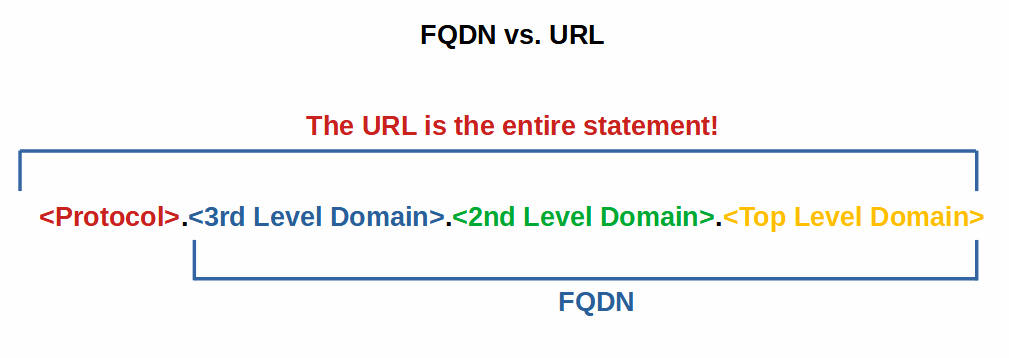
A Fully Qualified Domain Name (FQDN) is the complete domain name that specifies the exact location of a host in the DNS hierarchy, including all its subdomains up to the top-level domain (TLD). It always ends with a dot (.) representing the root zone, although most software omits it.
DNS records
A DNS record is a database record in the Domain Name System (DNS) that maps a domain name to specific information related to that domain. Each record has a type:
A
Maps a name to an IPv4 address.
Multiple A Records:
DNS allows you to define more than one A record for the same domain name:
How It Works: When a client queries example.com the DNS resolver can return all available IP addresses in the A records. The client (or its local resolver) will typically try the first IP, and if it fails, try the next one. Some resolvers rotate the order of returned IPs (round-robin DNS).
Round-robin DNS is a simple, cost-effective load-balancing technique that distributes network traffic across multiple servers by cycling through a list of IP addresses (A or AAAA records) associated with a single domain name
Load Balancing: By having multiple IPs, traffic to the same domain can be distributed across multiple servers. This:
- Reduces load on a single server
- Improves redundancy (if one server is down, another can handle requests)
AAAA
Same as A, but for IPv6.
Modern resolvers often try AAAA first, then A.
NS (Name Server)
Specifies authoritative DNS servers for the domain.
Resolvers use NS records to know where to ask next. If NS records are wrong, the domain effectively disappears.
This is the backbone of DNS delegation.
SOA (Start of Authority)
Defines the authoritative information about a DNS zone, including which server is the authoritative source and how zone data is managed.
Every DNS zone must have exactly one SOA record.
CNAME (Canonical Name)
Maps an alias name to a canonical domain name.
Example:
login.example.com → auth.provider.com
DNS then resolves the target name.
MX (Mail Exchange)
Defines where email for a domain should be delivered.
Includes priority:
- Lower number = higher priority
Mail servers rely on MX records before delivering email.
TXT (Text)
Allows a domain administrator to store arbitrary text data associated with a domain.
PTR (Pointer)
Performs reverse DNS lookups, mapping an IP address to a hostname.
Controlled by the IP owner, not the domain owner. The owner of the IP block (usually an ISP or hosting provider) controls the reverse DNS zone.
Normal DNS zones map names, PTR records do the opposite.
DNS is hierarchical and works from right to left, to make reverse lookups fit into the same hierarchical system, a special domain was created:
-
IPv4:
in-addr.arpa(arpa = Advanced Research Projects Agency) -
IPv6:
ip6.arpa
These special domains let the DNS system treat IP addresses like names in a hierarchical structure.
Example: 34.2.0.192.in-addr.arpa.
- in-addr.arpa = root of reverse DNS
- 192 = top-level network (closest to root in hierarchy)
- 0 = subnet
- 2 = smaller subnet
- 34 = final host
By reversing the octets, the most significant part of the IP appears closest to the root, matching the hierarchical structure of DNS. This makes delegation easier.
IPv6: Same idea, but IPv6 addresses are hexadecimal and 128 bits, so every hex digit is separated by dots in reverse order to fit the hierarchical structure.
Example: An ISP owns 192.0.2.0/24. They control 2.0.192.in-addr.arpa. and can create PTR records for their customers.
Keeps reverse DNS consistent with normal DNS lookup mechanics, so standard DNS servers can resolve PTR queries efficiently.
SRV (Service)
Defines location of servers for specific services, including hostname, port, priority, and weight.
CAA (Certificate Authority Authorization)
Specifies which Certificate Authorities (CAs) are allowed to issue SSL/TLS certificates for a domain.
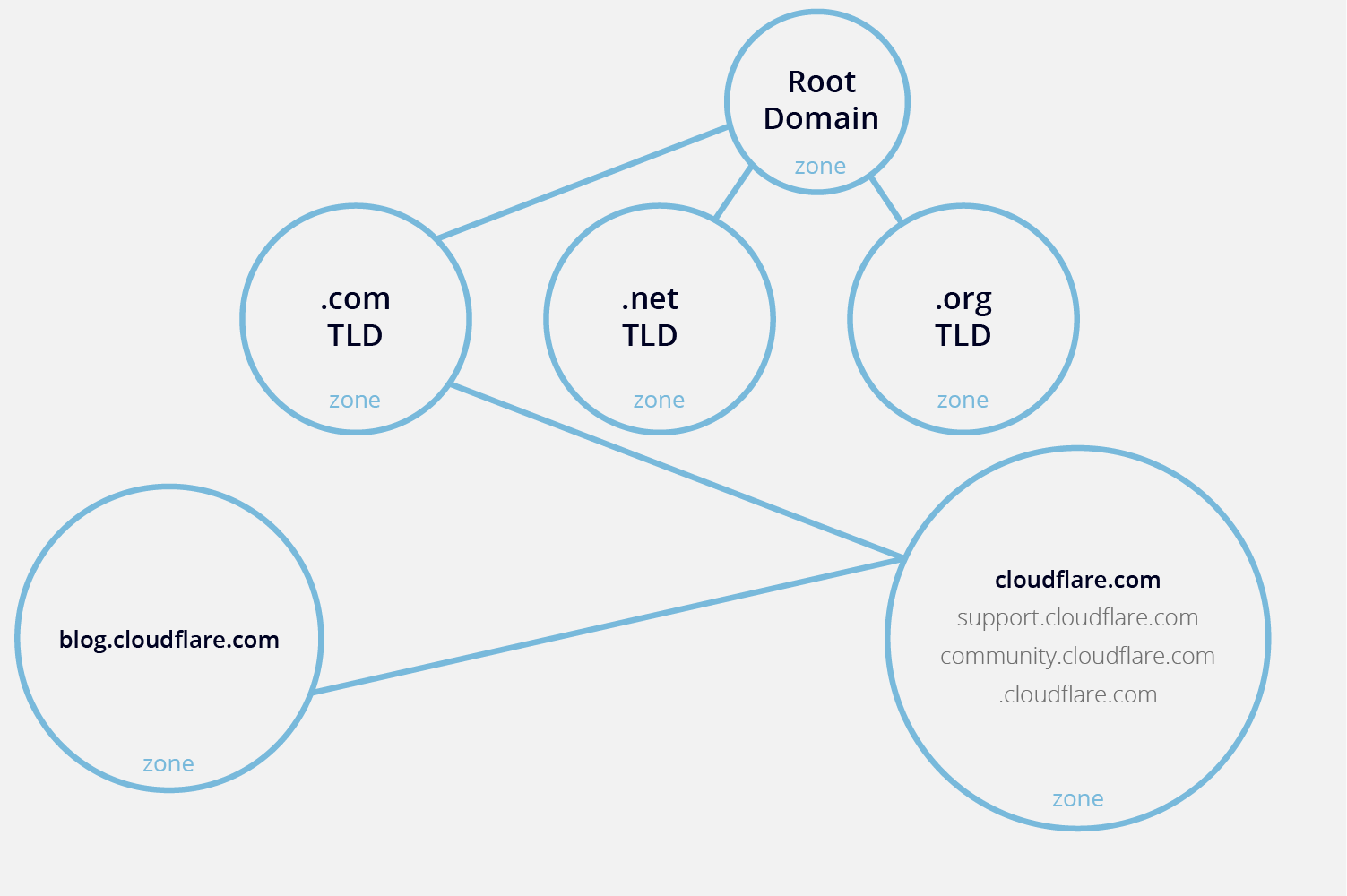
DNS zone
A DNS zone is a specific portion of the DNS namespace in the Domain Name System (DNS), which a specific organization or administrator manages.
DNS actors
Stub resolver
- Lives on client
- Asks recursive resolver
- No intelligence
Recursive resolver
- ISP / enterprise / public (8.8.8.8)
- Performs full lookup
- Caches aggressively
- Prime attack target
Authoritative server
- Source of truth for a zone
- Never recurses
8. DNS resolution flow (must visualize)
Resolving www.example.com:
- Client → OS (hosts, cache)
- OS → recursive resolver
- Resolver cache check
- Root →
.com - TLD →
example.com - Authoritative server → final answer
- Resolver caches
- Client receives answer
Every step is a packet. Every packet is attackable.